
NEWS
Googlebooks Hit Shelves With Finished Hardware and a New OS
Googlebooks are on shelves from $899. The ASUS 14 hardware looks finished. Googlebook OS still has to be learned.

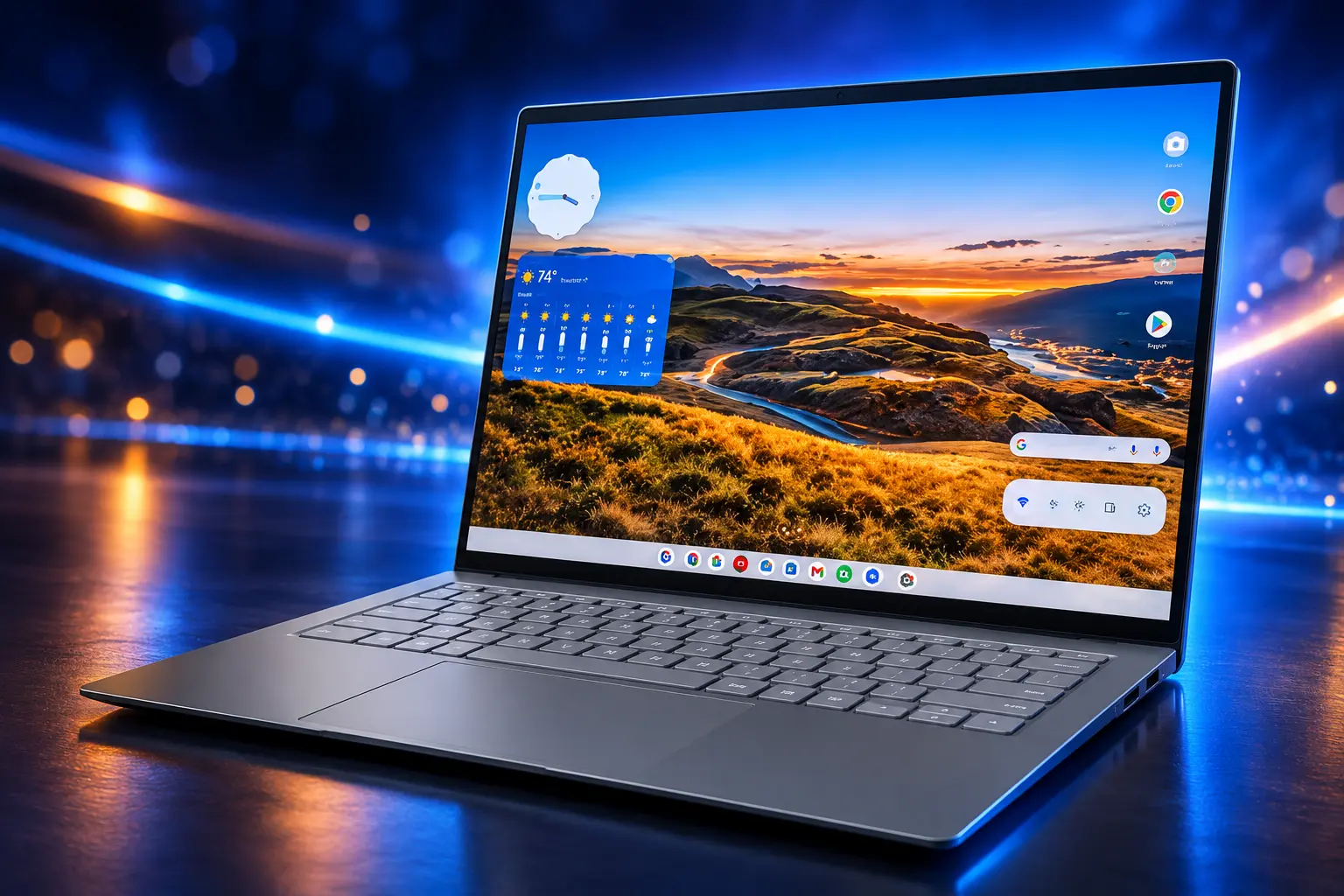
Review units of the ASUS Googlebook 14 arrived on October 5 as the first Googlebooks reached stores. It is a $1,299.99 clamshell that weighs 0.99 kg and runs Googlebook OS, a new desktop built on Android with ChromeOS windowing. The metal feels finished. The software asks even longtime Chromebook users to start over.
Google opened preorders on September 21. US retail began October 4, with Canada, the UK, Ireland, France, Germany, and Australia on October 5. Sameer Samat, president of the Android ecosystem at Google, said the machines were built for Android phone owners, not as a quiet ChromeOS refresh.
The ASUS 14 Feels Like a Finished Laptop
The unit that showed up for first looks is the lightest of the five launch machines. ASUS machines the chassis from magnesium-aluminum, coats it in Nano Ceramic, and finishes it in Dusk Ash. The shell is 10.9 mm thick, tested to MIL-STD 810H, and it does not flex in the hand. That is the point of spending $1,299.99 on a Google laptop in 2026: it is supposed to feel like a premium notebook, not a school netbook.
The 14-inch 3K OLED HDR touchscreen is a 16:10 panel at 120 Hz with up to 1000 nits peak HDR brightness, under Corning Gorilla Glass Victus with a matte anti-glare treatment. In office light the coating cuts reflections without killing contrast. The backlit keyboard uses 1.5 mm of travel. The haptic pad reads six force sensors. A six-speaker array with force-canceling woofers and tweeters is louder and fuller than the thin body suggests.
ASUS GOOGLEBOOK 14 AT A GLANCE
- Weight and size: 0.99 kg (2.18 lb) and 10.9 mm thin in a 14-inch clamshell.
- Panel: 3K OLED touch, 120 Hz, up to 1000 nits peak HDR, 16:10.
- Power: up to Intel Core Ultra 7 Series 3, up to 64 GB of LPDDR5X, up to a 1 TB PCIe 4.0 SSD, 47 TOPS NPU.
- Battery: 70 Wh pack, rated up to 18 hours, with Wi-Fi 7 and two Thunderbolt 4 ports plus USB-A and HDMI 2.1b.
Base review configurations seen in first looks pair a Core Ultra 5 325 with 16 GB of memory and a 512 GB drive. ASUS also lists a Core Ultra 7 355 path. Early use showed no stutter or frame drop in light work. The weak spot on the ASUS unit is a 1080p webcam, fine for a call and thin for a laptop that otherwise behaves like a luxury machine.
Five Launch Models Sit Between $899 and $1,299.99
Google did not ship a Pixel-branded Googlebook. Acer, Dell, Lenovo, HP, and ASUS took the first wave, and the Google Store currently lists three of them next to each other. The floor is 16 GB of RAM, a touchscreen, and Googlebook OS. The Acer Googlebook starts at $899 as the only convertible. The ASUS 14 sits $400.99 above that floor.
THE LAUNCH LINEUP
| Model | US start price | Display | Processor | Weight | Claimed battery |
|---|---|---|---|---|---|
| Acer Googlebook 14 | $899 | 14-inch OLED, 2880 x 1800, convertible | Intel Core Ultra 5 325 | 2.5 lb | Up to 16 hours |
| XPS Googlebook | $999 | 13.4-inch IPS LCD, 2560 x 1600 | Snapdragon X Elite | 2.2 lb | Up to 18 hours |
| Lenovo Googlebook 15 | $1,149 | 15.3-inch OLED, 2880 x 1800 | Intel Core Ultra 5 325 | 2.8 lb | Up to 13 hours |
| HP Googlebook 14 | $1,199.99 | 14-inch 3K OLED | Snapdragon X Elite | 2.74 lb | Not listed here |
| ASUS Googlebook 14 | $1,299.99 | 14-inch 3K OLED, 120 Hz | Intel Core Ultra 5 or 7 Series 3 | 2.18 lb | Up to 18 hours |
HP’s own newsroom put the HP Googlebook 14 starting price at $1,199.99 for October sale at HP.com and Best Buy, and gave that model a 5MP camera the ASUS unit does not match. Snapdragon X Elite machines in the set quote a 45 TOPS NPU. Every Googlebook includes 12 months of Google AI Pro with 5TB of cloud storage. Google prices that plan at $19.99 a month after the trial, which is $239.88 for twelve months. The Store also counts Adobe apps and other trials as a $500 bundle, a wider package than the AI plan alone. Phone features need Android 17 or newer.
Googlebook OS Rebuilds the Desktop on Android
The shock is not the hinge. It is the login screen. Googlebook OS keeps a desktop Chrome browser, extensions, and a Linux environment, and it still looks cousin to ChromeOS in the dock. Under that, Google moved the platform onto the Android stack so Play apps run as native software instead of guests in a container. Widgets and files can sit on the desktop. Windowing, file handling, and how Android apps scale to a keyboard are new work, not a theme pack.
That is why a morning on the ASUS 14 feels exciting and heavy at once. Muscle memory from a decade of Chromebooks does not map cleanly onto a desktop that treats Android as the base and Gemini as a system layer. Early hands-on use already shows a split that will confuse people: some Google tools still open as websites, while Gemini and the Google app behave like phone software. Web app, Play app, and Linux tool can all exist for the same job.
WHAT CHANGES FROM CHROMEOS
- The base layer: Android is the platform, with ChromeOS-style desktop chrome on top, rather than Android apps in a sidecar.
- The cursor: Magic Pointer lets you wiggle the pointer over a date, a block of text, or two images and hand that selection to Gemini.
- The dictation key: Rambler sits on a Quick Insert key that takes the old Caps Lock spot and turns speech into cleaner notes.
- The phone: Cast My Apps and Continue On put phone apps and files on the laptop taskbar, if the handset runs Android 17 or above.
Samat’s pitch on October 5 skipped the Chromebook veteran and went straight at the Pixel owner. He said whatever is on the phone should be waiting on the desktop taskbar, with no emailing of files and no sync delay.
Googlebook is officially on shelves today! 💻
If you’re an Android user, these were built specifically for you.
It completely changes how you move between screens. Whatever you’re looking at on your Android phone is instantly waiting on your desktop taskbar the second you sit… pic.twitter.com/YPnZOvZ5Po— Sameer Samat (@ssamat) October 5, 2026
That is a coherent product if you live on an Android phone. It is a tax if you bought Chromebooks because they stayed out of the way. The desktop chrome still reads like an older ChromeOS cousin, and a floating taskbar plus native Microsoft and creator apps are already on the request list. Google is selling phone continuity. The missing Windows-class software is the hole that pitch does not fill.
What Longtime Chromebook Users Should Expect on Day One
Someone happy on a current Chromebook Plus should not treat this as a drop-in upgrade. The browser is still the browser. Linux is still advertised. The daily paths around windows, local files, and Android apps are different enough that a 10-year ChromeOS habit becomes a liability for a week or three. Google has said the platform will move fast, the way ChromeOS did after its own awkward first year. That is a promise, not a review.
The safer move, if the old machine still does the job, is to let the first software cycle land. Intel-based Googlebooks also have an early warning attached: some Android apps are expected to run poorly on that silicon, which puts a split inside a five-model launch that already splits Intel and Snapdragon. Rick Osterloh, Google’s SVP of platforms and devices, backed the October 5 on-sale message and pointed at Gemini Intelligence and 10 years of automatic updates. Those 10 years attach to Googlebook OS, not to the ChromeOS line in the closet.
ChromeOS Spent 15 Years Winning on Simplicity
Google has been here before, cheaper and stranger. On December 7, 2010, it showed the Cr-48, an unbranded 12.1-inch test laptop for a browser-only OS. About 60,000 units went to a pilot. Retail Chromebooks followed in 2011 from Samsung and Acer, with the Acer AC700 opening at $349 and the Samsung Series 5 at $429. The pitch was speed, a few-second boot, and no software to babysit.
With Chrome OS we have a viable third choice for OS on the desktop.
Eric Schmidt, then Google CEO, San Francisco launch, December 2010
The expensive sequel was the Pixelbook in 2017, listed from $999 and running up to $1,649, Google’s own halo Chromebook with Android apps in the box. It proved the company could build a handsome machine. It did not make a $1,000 ChromeOS laptop the default. Googlebooks try that premium band again, this time with OEM names on the lid and an OS that is no longer “just Chrome.”
FROM CR-48 TO GOOGLEBOOK
- December 7, 2010: Google shows the Cr-48 prototype and a browser-only desktop.
- May 2011: Acer and Samsung ship the first retail Chromebooks, from $349.
- 2017: The Pixelbook opens at $999 as Google’s own premium Chromebook.
- September 21, 2026: Preorders open for five Googlebooks from $899.
- October 4, 2026: US stores get the first machines; other listed countries follow October 5.
- Second half of 2027: Google plans the first wave of Googlebook fleet-management tools.
- Mid-2034: ChromeOS is slated to stop regular updates and security patches.
The joke hiding in that list is simple. ChromeOS won classrooms by being boring, cheap, and easy to lock down. Googlebook OS is being sold as the opposite: a $899-and-up Android desktop with Gemini in the cursor. The hardware can carry that story. The first-week software still has to earn it.
Schools Do Not Get Admin Tools Until 2027
A Chrome Enterprise and Education help page, last updated September 23, 2026, is blunter than the launch videos. Chromebooks stay on sale for schools and businesses. Existing Education and Enterprise upgrades keep working on those devices. Googlebook’s first wave is consumer-only and does not support domain enrollment. The first core management tools are scheduled for the second half of 2027. Migration to Googlebook OS will use a new license, not the ChromeOS upgrade schools already pay for.
The same page says updates and security patches through mid-2034 will continue for ChromeOS. Devices bought now whose 10-year clock would have run past that date are told to plan on a move to Googlebook OS, with “many” newer commercial Chromebooks eligible and details later. That is how an eight-year remainder replaces a 10-year promise for some new purchases, unless the box can take the new OS.
WHAT WE KNOW
- Consumer first: The 2026 Googlebook launch has no domain enrollment and no school admin console.
- ChromeOS continues: Current Chromebooks keep updates through each device’s supported life, with the platform clock set at mid-2034.
- New licenses: Googlebook management will not ride on existing Chrome Education or Enterprise upgrades.
WHAT IS UNCONFIRMED
- Which Chromebooks move: Google has not published the eligible model list or the migration steps.
- What the new license costs: Pricing for Googlebook fleet management is still unlisted.
- When classrooms see hardware: No education Googlebook SKU is in the first five.
So the people who made Chromebooks a default in schools are being asked to wait while Google sells $899-to-$1,299.99 consumer laptops that IT cannot take in. The student fleet stays on the old OS. The expensive new one is a personal gadget with a Glowbar and a year of Gemini.
On-Device Gemini Does Not Need the Paid Tier
Magic Pointer, Rambler, and Create My Widget are the three names Google is using to justify a new desktop. Magic Pointer identifies what is under the cursor. Rambler turns a ramble into structured text. Create My Widget builds a desktop widget from a plain description. Google has said the on-device identification step in Magic Pointer stays on the laptop; the cloud is involved when you actually send a Gemini command. After month 12, those system tools are supposed to remain free. The standalone Gemini app’s heavier cloud jobs go back behind Google AI Pro at $19.99 a month.
GEMINI FEATURES AFTER MONTH 12
- Stays free: Magic Pointer, Rambler, Create My Widget, and other system-level help baked into Googlebook OS.
- Needs the plan: Big-context uploads, agent-style workflows, and top-tier generative media inside the Gemini app.
- Needs a new phone: Task handoff, phone-app casting, and live phone files require Android 17 or above.
The ASUS 14, sitting on a desk the week it shipped, makes the bet tactile. The hinge, the matte OLED, and the speakers are ready for a MacBook-class argument. Googlebook OS is a day-one desktop with a 2027 admin roadmap and a mid-2034 sunset hanging over the OS it grew out of. The box is the easy part.

Clay Moulds From the Blyth Hoard Fit Peebles Fittings

Treasury Yields Hit a 24-Year High as AI Joins the Queue

Crew-12 Leaves the ISS With Fedyaev and Adenot Aboard

The Graziers Recall Puts the 60-Day Cheese Rule on Trial

Hugo Chavez’s Hollywood Welcome Meets a Film About Escape

Sons of Behemat Add a Witch and a Middle Rank

Canada Still Clears Mazatlán as the Cartel War Arrives

The FTC Suit That Targets Amazon’s Hidden Ad Floor

Samsung Leads Mistral’s Record European Sovereignty Round

Laepple Automotive Bets on a Vacant Detroit Die Shop
-
 GAMING2 months ago
Sons of Behemat Add a Witch and a Middle Rank
-
 NEWS2 years ago
Canada Still Clears Mazatlán as the Cartel War Arrives
-
 BUSINESS2 months ago
The FTC Suit That Targets Amazon’s Hidden Ad Floor
-
 NEWS2 months ago
Samsung Leads Mistral’s Record European Sovereignty Round
-
 NEWS2 months ago
Apple’s Foldable iPhone Event Revives the Fingerprint Button
-
 AUTO2 years ago
Laepple Automotive Bets on a Vacant Detroit Die Shop
-

 AUTO2 years ago
Tamil Nadu Auto Keeps Growing Inside a Climate Red Zone
-

 LIFESTYLE2 years ago
The Unstoppable Rise of Hot Honey: Are Food Trends Making UK Restaurant Menus All the Same?